导言
遇到的DNS相关的问题
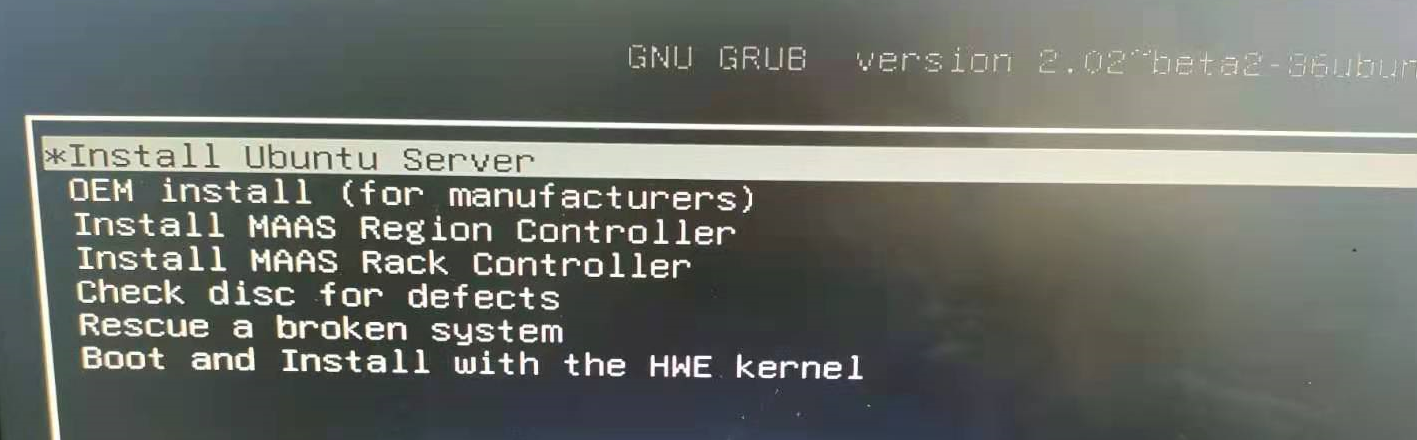
sudo passwd root只要在安装系统时分出一个/home分区。你可以把Ubuntu的“/”分区看为Windows的C盘,重装Ubuntu时只格式化“/”分区,不格式化“/home”,这样就可以保留“/home”中的数据了。使用的时候就挂载就行
但是假如一开始没分区:
xfs类型不可以直接缩减,只扩不减。如果是ext2,ext3,ext4可以在线缩减,如果xfs盘要缩小就要删除后重新添加
1 | umount /lv/ #取消挂载目录 |
1 | e2fsck -f /dev/vg0/lv0 |
df -h查看的空间1 | resize2fs /dev/vg0/lv0 10G |
1 | lvreduce -L 10G /dev/vg0/lv0 |
1 | mount -a |
正常启动系统进入救援模式 :启动按shift键,出现选择系统界面,按e。找到以单词 linux 开头的行,并在该行的末尾添加以下内容(要到达末尾,只需按下 CTRL+e 或使用 END 键或左右箭头键):
1 | systemd.unit=rescue.target |
添加完成后,只需按下 CTRL+x 或 F10 即可继续启动救援模式。几秒钟后,你将以 root 用户身份进入救援模式(单用户模式)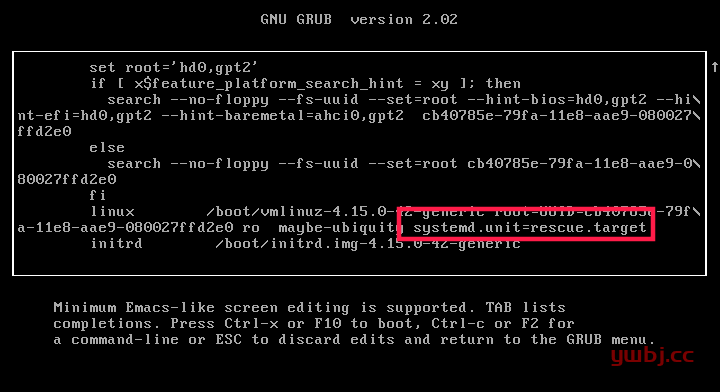
暂无
https://blog.csdn.net/weixin_40018873/article/details/109537532


暂无
暂无
https://developer.qiniu.com/fusion/kb/3725/how-to-apply-for-and-use-free-certificate
1 | shaojiemike @ node5 in ~ [7:20:31] |
1 | source /opt/intel/oneapi/setvars.sh |
1 | ipcc22_0029@ln121 ~/github/IPCC2022-preliminary/run (float_trick*) [10:49:48] |
For MPICH, according to the mpicc man pages, mpicc -compile_info shows the flags for compiling a program, and mpicc -link_info shows the flags for linking a program.
-showme (Open MPI) or -show (Open MPI, MPICH and derivates) use -showme:compile and -showme:link to obtain the options automatically
1 | > mpirun -info |
1 | ipcc22_0029@ln121 ~ [11:55:08] |
1 | ## 安装了IB支持 |
暂无
暂无
https://stackoverflow.com/questions/11312719/how-to-compile-mpi-with-gcc
1 | MPI_Init(&argc, &argv); |
StackOverflow的回答是,Init在调用过程中初始化MPI库,并且在进程间建立通讯和编号。
知乎的回答: OpenMPI会在调用MPI_Init时按照你传递给mpirun的指令新建进程,而你传递给MPI_Init的参数,会被传递给新建的进程。
这似乎在暗示,两个进程不是同时产生和运行的。
有顺序的观点是不成立的
即使有顺序 malloc的时间也没这么长。
难道是malloc的数据需要MPI_Init复制一遍?
简单将MPI_Init提前到最开始,时间也基本没变,也不对。
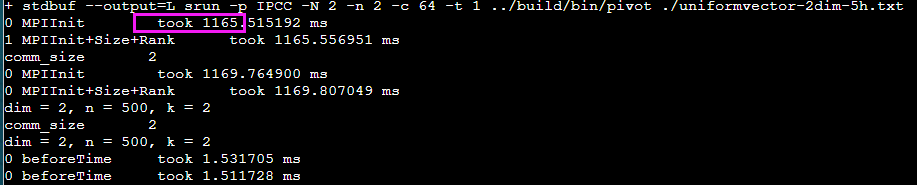
如果单独写一个只有MPI_Init的程序,IntelMPI还是要耗时800ms
1 | ipcc22_0029@ln121 ~/slurm/MPIInit [11:42:32] |
以IPCC2022初赛的北京超算云 AMD机器举例
| mpirun的选择 | mpi版本 | GCC或者ICC的选择版本 | 超算运行 | MPI_Init时间(ms) |
|---|---|---|---|---|
| IntelMPI | mpi/intel/2022.1 | gcc/10.2.0 | 只能sbatch,不能srun | 1282.24 ~ 1678.59 |
| OpenMPI | mpi/openmpi/4.1.1-gcc7.3.0 | 2706ms~3235ms | ||
| MPICH | mpich/3.1.4-gcc8.1.0 | 17ms | ||
| mpich/3.4.2 | gcc/10.2.0 | 107ms |
需要export I_MPI_PMI_LIBRARY=libpmi2.so
设置这个Intel mpi 1200 -> 1100
1 | export PMI_TIME=1 |
实在是弄不懂,为什么不同的实现,时间差别这么大。可能慢是因为额外的通路设置,是为了之后的快速传输??
3.1.4的安装选项也看不到
1 | > mpiexec --version |
暂无
必须先安装base,可以看到默认安装的内容
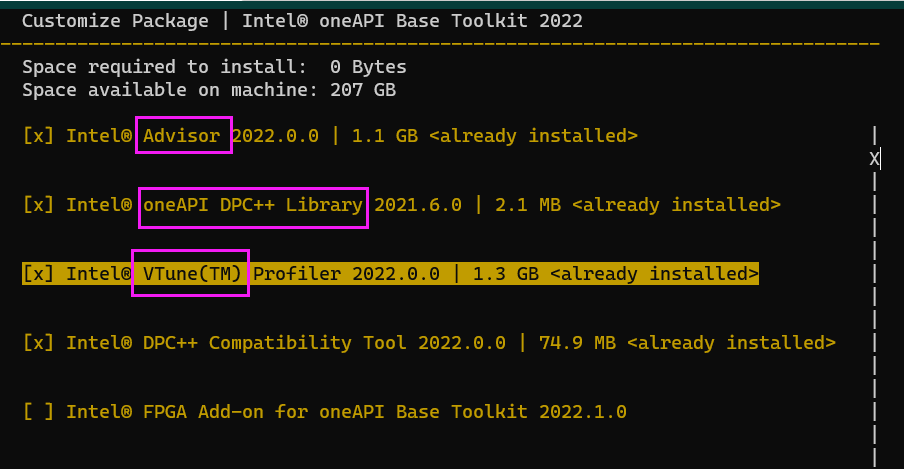
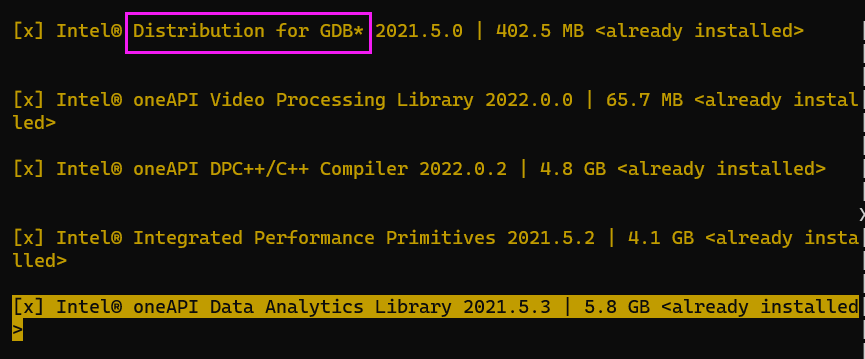
这个GDB好像可以分析多进程
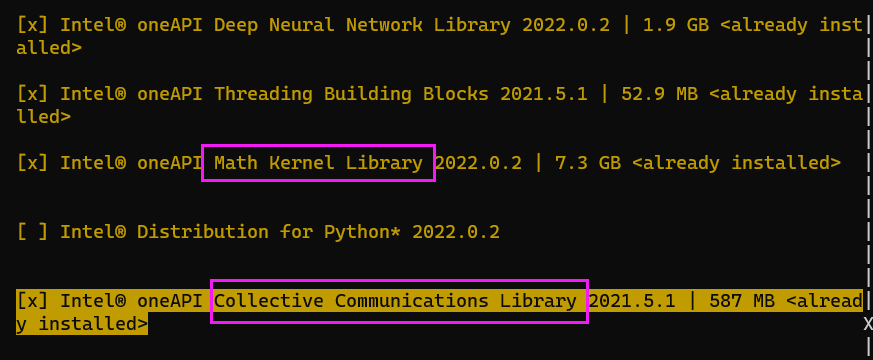
Intel OneAPI HPC toolkit包括了icc,icpc,ifort和OpenMP,IntelMPI还有MKL(Intel® oneAPI Math Kernel Library (oneMKL))
在Download界面选择版本, 选择online或者offline会有推荐指令,如下
1 | wget https://registrationcenter-download.intel.com/akdlm/irc_nas/18679/l_HPCKit_p_2022.2.0.191.sh |
1 | > icx -v |
暂无
暂无
| 命令 | 压缩空间效果 | 压缩时间效果 | 解压时间 | 说明 |
|---|---|---|---|---|
| tar -cf | 2.9G | 13.8s | 3.3s | tar -cf archive.tar foo归档文件,没有压缩功能 |
| tar -zcf | 823M | 1:44 | 19s | tar -zcf archive.tar.gz foo归档并使用gzip压缩文件,gzip是zip的GNU实现,是最老的公开压缩方法 |
| zip -1r | 856M | 48.6s | 23.3s | zip -1qr intel.zip intel, -1 compress faster,unzip解压 |
| zip -9r | 824M | 11:19 | 24s | 压缩这也太慢了吧 |
| rar a | 683M | 2:02 | 46s | unrar x解压 |
上述测试基于大小3GB的文件夹
虽然说好像有专利的软件,但是sudo apt install rar貌似就可以安装。但是空间效果确实还行多压1/3,但是时间要多两倍。
| 命令 | 作用 |
|---|---|
| module avail 或 module av | 查看系统中可用的软件 |
| module add 或 module load | 加载模块 |
| module rm 或 unload | 卸载模块 |
| module list 或 module li | 显示已加载模块 |
| module purge | 卸载所有模块 |
| module show | 显示模块配置文件 |
| module swap 或 module switch | 将模块1 替换为 模块2 |
| module help | 查看具体软件的信息 |
1 | source /public1/soft/modules/module.sh |
暂无
暂无
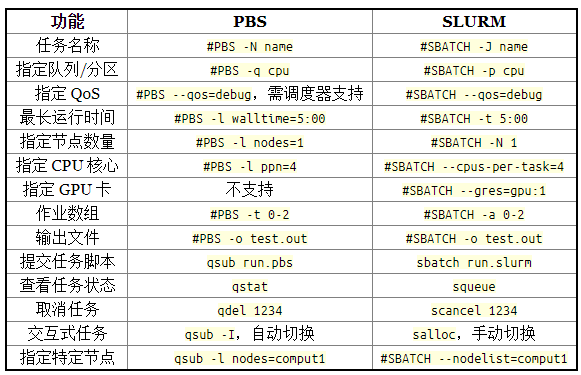
1 | scontrol show job 7454119 |
1 | format=jobid,jobname,partition,nodelist,alloccpus,state,end,start,submit |
1 | [sca3190@ln121%bscc-a5 ~]$ sacct -D -T -X -u sca3190 -S 2021-11-10T00:00:00 -E 2021-11-30T00:00:00 --format "JobID,User,JobName,Partition,QOS,Elapsed,Start,NodeList,State,ExitCode,workdir%70" |
1个task 64核
1 | #SBATCH --nodes=1 |
建议sbatch 加入-t, --time=minutes time limit#SBATCH -t 5:00
第二年参加IPCC发现去年的一个程序跑了很久。
导出excel 获得jobID 1050223
1 | $ sacct -D -T -X -u sca3190 -S 2021-11-10T00:00:00 -E 2021-11-30T00:00:00 --format "JobID,JobName,State,workdir%70" |
NODE_FAIL - Job terminated due to failure of one or more allocated nodes.
查看提交脚本,没有什么问题。
1 | #!/bin/bash |
查看Log文件
1 | sca3190@ln121%bscc-a5 src]$ cat slurmlog/job_1050223_rank0_fa0208_0.out |
猜测原因是: 卡在编译了。
以后最好不要在sbatch脚本里编译
暂无
暂无
public/*.html根据公开的仓库,hugo的html文件会产生在gh-pages分支下
1 | name: build |
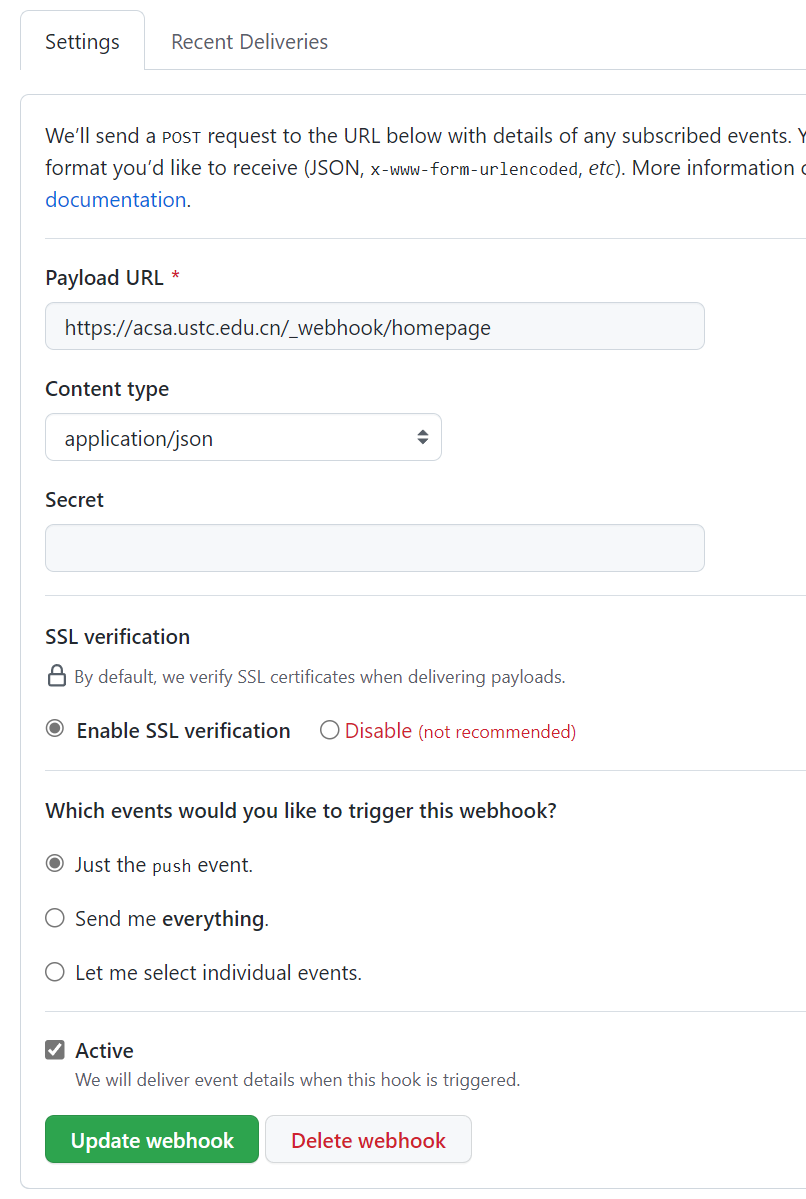
接收端转发到内网的机器上(通过修改vim /etc/nginx/sites-enabled/default)
1 | server{ |
记得reload systemctl reload nginx
Nginx中location的作用是根据Url来决定怎么处理用户请求(转发请求给其他服务器处理或者查找本地文件进行处理)。location支持正则表达式,配置十分灵活。我们可以在一个虚拟主机(nginx中的一个server节点)下配置多个location以满足如动静分离,防盗链等需求。
在snode5上nginx也需要转发
1 | location /_webhook/ { |
暂无
暂无